|
网页的本质就是超级文本标记语言,通过结合使用其他的Web技术(如:脚本语言、公共网关接口、组件等),可以创造出功能强大的网页。因而,超级文本标记语言是万维网(Web)编程的基础,也就是说万维网是建立在超文本基础之上的。超级文本标记语言之所以称为超文本标记语言,是因为文本中包含了所谓“超级链接”点。 这篇文章主要介绍了JS中使用DOM来控制HTML元素的相关资料,需要的朋友可以参考下1.getElementsByName():获取name. ~~~~~~~~~~~~~~~~~~~~~~~~~~~~~~~~~~` 例: <p name="pn">hello</p>
<p name="pn">hello</p>
<p name="pn">hello</p>
<script>
function getName(){
var count=document.getElementsByName("pn");
alert(count.length);
var p=count[2];
p.innerHTML="world";
}
</script>结果:界面打印出三个hello,并且伴有一个提示框“3”,当点击确定后,界面显示的内容变为hello hello world ~~~~~~~~~~~~~~~~~~~~~~~~~~~~~~~~~~~~~~~~~~~~~~~~~·· 2.getElementsByTagName():获取元素。 ~~~~~~~~~~~~~~~~~~~~~~~~~~~~~ 例 <p>hello</p>
<p>hello</p>
<p>hello</p>
<script>
function getName(){
var count=document.getElementsByTagName("p");
alert(count.length);
var p=count[2];
p.innerHTML="world";
}
</script>结果:界面打印出三个hello,并且伴有一个提示框“3”,当点击确定后,界面显示的内容变为hello hello world ~~~~~~~~~~~~~~~~~~~~~~~~~~~~~~~~~~~~~~~~~~~~~~~~~~ 3.getAttribute():获取元素属性。 ~~~~~~~~~~~~~~~~~~~~~~~~~~~~~~~~~~ 例 <a id="aid" title="得到a的标签属性"></a>
<script>
function getAttr1(){
var anode=document.getElementById("aid");
var attr=anode.getAttribute("id");
alert("a的ID是:"+attr);
}
function getAttr2(){
var anode=document.getElementById("aid");
var attr=anode.getAttribute("title");
alert("a的title内容是:"+attr);
}
getAttr1();
getAttr2();
</script>结果:弹出提示框“a的ID是:aid”.点击确定后,弹出提示框“a的title内容是:得到a的标签属性”。 ~~~~~~~~~~~~~~~~~~~~~~~~~~~~~~~~~~~ ~~~~~~~~~~~~~~~~~~~~~~~~~~~~~~~~~~~~ 例 <a id="aid2">aid2</a>
<script>
function setAttr(){
var anode=document.getElementById("aid2");
anode.setAttribute("title","动态设置a的title属性");
var attr=anode.getAttribute("title");
alert("动态设置的title值为:"+attr);
}
setAttr();
</script>结果:弹出提示框“动态设置的title值为:动态设置a的title属性”。 ~~~~~~~~~~~~~~~~~~~~~~~~~~~~ 5.childNodes():访问子节点。 ~~~~~~~~~~~~~~~~~~~~~~~~~~·· 例 <ul><li>1</li><li>2</li><li>3</li></ul>
<script>
function getChildNode(){
var childnode=document.getElementsByTagName("ul")[0].childNodes;
alert(childnode.length);
alert(childnode[0].nodeType);
}
getChildNode();
</script>结果:界面打印出.1 .2 .3弹出对话框“3”,按确定后弹出“1”。 ~~~~~~~~~~~~~~~~~~~~~~~~~~~~~~~~~~~~~~~~ 6.parentNode():访问父节点。 ~~~~~~~~~~~~~~~~~~~~~~~~~~~~~~~~· 例 <p>
<p id="pid"></p>
</p>
<script>
function getParentNode(){
var p=document.getElementById("pid");
alert(p.parentNode.nodeName);
}
getParentNode();
</script>结果:弹出提示框:p. ~~~~~~~~~~~~~~~~~~~~~~~~~~~~~~~~~~ 7.createElement():创建元素节点。 ~~~~~~~~~~~~~~~~~~~~~~~~~~~~~~~~ 例:
 <script>
       function createNode(){
             var body=document.body;
             var input=document.createElement("input");
             input.type="button";
             input.value="按钮";
             body.appendChild(input);//插入节点
        }
         createNode();
 </script>
结果:出现一个按钮。 ~~~~~~~~~~~~~~~~~~~~~~~~~~~ 8.createTextNode():创建文本节点。 ~~~~~~~~~~~~~~~~~~~~~~~~~~~~~~ 例:
    <script>
        function createNode(){
              var element = document.createElement("p");
              element.className = "message";
              var textNode = document.createTextNode("Hello world!");
              element.appendChild(textNode);
              document.body.appendChild(element);
        }
      createNode();
   </script>
代码分析:这个例子创建了一个新<p>元素并为它指定了值为“message”的class特性。然后,又创建了一个文本节点,并将其添加到前面创建的元素中。最后一步,就是将这个元素添加到了文档中的<body>元素中,这样可以在浏览器中看到新创建的元素和文本节点了。 结果:页面显示hello world。 ~~~~~~~~~~~~~~~~~~~~~~~~~~~~~~~~~~~~~~~~~~~ 9.insertBefore():插入节点。 ~~~~~~~~~~~~~~~~~~~~~~~~~~~~~~~~ 例 <p id="p">
<p id="pid">p元素</p>
</p>
<script>
function addNode(){
var p=document.getElementById("p");
var node=document.getElementById("pid");
var newnode=document.createElement("p");
newnode.innerHTML="动态插入一个p元素";
p.insertBefore(newnode,node);
}
addNode();
</script>结果:界面打印出:动态插入一个p元素 p元素 ~~~~~~~~~~~~~~~~~~~~~~~~~~~~~~~~~~~~~~~ 10.removeChild():删除节点。 ~~~~~~~~~~~~~~~~~~~~~~~~~~~~~· 例 <p id="p">
<p id="pid">p元素</p>
</p>
<script>
function removeNode(){
var p=document.getElementById("p");
var p=p.removeChild(p.childNodes[1]);
}
removeNode();
</script>结果:界面什么也没显示。 ~~~~~~~~~~~~~~~~~~~~~~~~~~~~~~~~~~~ 11.offsetHeight:网页尺寸 12.scrollHeight:网页尺寸 ~~~~~~~~~~~~~~~~~~~~~~~~~~~· 例:
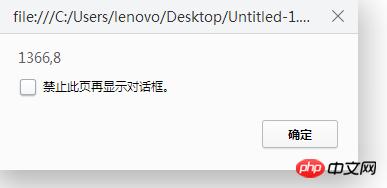
  <script>
      function getSize(){
          var width=document.documentElement.offsetWidth||document.body.offsetWidth;//解决兼容问题
          var height=document.documentElement.offsetHeight||document.body.offsetHeight;
          alert(width+","+height);
      }
      getSize();
 </script>
显示结果:
以上就是本文的全部内容,希望对大家的学习有所帮助,更多相关内容请关注PHP中文网! 相关推荐: 以上就是如何使用JS中DOM来控制HTML元素的详细内容,更多请关注php中文网其它相关文章! 网站建设是一个广义的术语,涵盖了许多不同的技能和学科中所使用的生产和维护的网站。 |
温馨提示:喜欢本站的话,请收藏一下本站!
本站发布的Win7纯净版系统、Win10纯净版和XP纯净版系统仅为个人学习测试使用,请在下载后24小时内删除,不得用于任何商业用途,否则后果自负,请支持购买微软正版软件!
本站所有资源全部来自于网络资源,如侵犯到您的权益,请及时通知我们(),我们会及时处理.
Copyright © 2018-2020 萝卜系统下载站 手机站 关于本站